
Meet SnipSnap: An Original Screen Capture and Annotation Tool Built for Efficiency
Jules Villarta
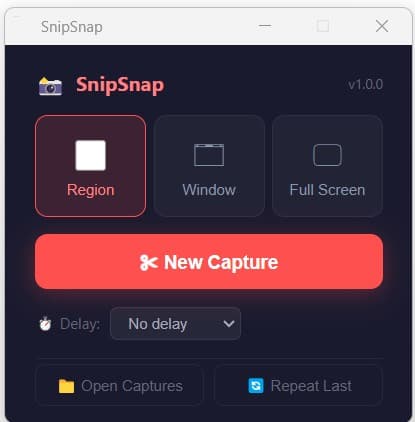
SnipSnap launcher window showing capture modes and the New Capture button
For years, I relied on a popular cutting tool for my screen capture needs. It was powerful, feature-rich, and did exactly what I needed. But the price kept going up. Year after year, the subscription fees climbed higher, and I found myself asking: do I really need to pay this much just to take screenshots and add arrows?
The answer was no, so I built something better.
The Problem with Cutting Tools and Subscriptions
Screen capture is a fundamental task for anyone who creates documentation, tutorials, reports, or client deliverables. Whether you are a consultant, a trainer, a developer, or a business owner, you need to capture screenshots, annotate them, and share them, often as PDFs.
The problem is that most professional cutting tools have moved to subscription models with annual fees that can easily reach hundreds of dollars. If you are a solopreneur or a small business owner, that cost adds up fast.
The built-in Windows Snipping Tool is free, but it adds friction. You take a screenshot, save it as an image, open a PDF editor, import the screenshot, adjust the layout, and then export as PDF. That is several extra steps for what should be one click.
What Is SnipSnap?
SnipSnap is an original screen capture and annotation tool built for Windows, developed entirely for personal use. It is designed to be fast, intuitive, and self-contained with no installation required, no subscription, no account, and no hidden costs.
Important: SnipSnap is an original, custom-built screen capture and annotation tool developed entirely from scratch. It is NOT affiliated with, endorsed by, or related to any other cutting tool, snipping tool, or screen capture software on the market. This software is provided "as-is", without warranty of any kind, express or implied. Users are responsible for complying with applicable laws regarding screenshot capture and content usage in their jurisdiction. No data is collected, stored, or transmitted by this application. All captures remain on your device.
Key Features
SnipSnap comes with everything you need for everyday screen capture and annotation:
- Three capture modes: Region (click and drag), Window (auto-detect), and Full Screen (one-click)
- Full annotation editor: Add rectangles, ellipses, arrows, lines, freehand drawing, text, callouts, step numbers, highlights, stamps, blur, magnify, fill, and eraser
- Direct PDF export: Save your annotated screenshots as PDF with one click and no extra tools needed
- PNG and JPEG export: Save as image files with the native save dialog
- Clipboard copy: Copy your annotated image directly to the clipboard
- Undo and redo: Full history support for annotations
- Crop tool: Crop your captured image before saving
- Edge effects: Add drop shadow, torn edge, or rounded corners on export
- Delay timer: Set a 3, 5, or 10-second countdown before capture
- System tray: Runs in the background, accessible via tray icon or keyboard shortcuts
- Hotkeys: Print Screen, Ctrl+Shift+A, or F1 to trigger a capture anytime
- Pixel magnifier: 3× zoom loupe for precise region selection
- Crosshair lines: Full-screen alignment guides during region drag
How SnipSnap Solves the PDF Problem
One of the biggest frustrations with the built-in Snipping Tool is that it saves only images. If you need a PDF, you have to open a separate application, import the screenshot, adjust the layout, and export, at least three extra steps.
SnipSnap eliminates that entirely. After capturing and annotating your screenshot, simply click the 📕 PDF button in the editor toolbar. The PDF is generated instantly with the image embedded at full resolution, sized perfectly to fit the page. One click, done.
Built for Consultants, Trainers, and Business Owners
I built SnipSnap because I needed it myself. For administrative tasks, I create dozens of screenshots every week for documentation, proposals, training materials, and reports. The subscription costs were eating into my margins, and the Snipping Tool workflow was wasting my time.
SnipSnap is the tool I wished existed. Now it does.
Why I Built It with AI
SnipSnap was built using modern AI-assisted development, the same approach that now makes it possible for anyone to turn their specific business needs into custom internal tools without hiring a full development team.
With current AI tools, you no longer have to settle for off-the-shelf software that almost fits your needs, nor do you have to pay recurring subscriptions for features you barely use. Instead, you can describe what you need and have a working tool built in hours or days, not months. This is how SnipSnap went from an idea to a working application: by combining clear requirements with AI-powered development.
Whether it is a screen capture tool, a reporting dashboard, a client portal, or an internal workflow automation system, AI makes custom software development accessible to solo entrepreneurs, consultants, and small businesses. You no longer need venture capital or a dedicated engineering team to build the tools your business needs.
Getting Started
Using SnipSnap is simple:
- Download the portable executable (no installation required)
- Double-click to launch and the launcher window appears immediately
- Select your capture mode (Region, Window, or Full Screen) and click ✂ New Capture
- Select the area you want to capture
- Annotate, crop, or add effects in the editor
- Save as PNG, JPEG, or PDF, or copy to clipboard
The app runs from your system tray, so you can also trigger captures anytime using Print Screen, Ctrl+Shift+A, or F1 without opening the launcher.
Personal Use
SnipSnap is currently for personal use only. It is not being distributed or made publicly available at this time. The tool is still undergoing comprehensive testing to ensure stability and reliability.
In the future, after thorough testing and refinement, it may be made available more broadly. If you are interested in learning more or have questions, feel free to reach out through the Excelsior Consultancy Services contact page.
Need a Custom Tool for Your Business?
SnipSnap is just one example of what is possible when you combine a clear business requirement with modern AI-assisted development. If you have an idea for an internal tool, a client-facing application, or any custom software project, we can help bring it to life.
Visit https://ai-productbuilder.com to see our portfolio and learn how we turn business requirements into working software. Whether you need a desktop application, a web portal, or an automation tool, AI product development makes it faster and more affordable than ever before.
For inquiries, reach out through the Excelsior Consultancy Services contact page or visit the AI Product Builder portfolio to see examples of custom tools we have built.
#SnipSnap #ScreenCapture #AnnotationTool #PDF #PersonalUse #AIAssistedDevelopment #CustomSoftware #InternalTools #AIProductBuilder #ProductivityTools #BusinessTools #Screenshot #NoSubscription
Need help with HR compliance or business registration in the Philippines? Book a discovery call.